🔵 Ticketmaster QR Sharing
Ticketmaster QR sharing is supported, but you must choose the option that matches how the ticket appears.
To send a ticket to another person's Ticketmaster account, use Ticketmaster Ticket Transfer. QR sharing gives access to the barcode; it does not transfer the ticket to their account.
If you are new to QR sharing, first read How to Share QR Codes for the common workflow and security rules.
Create the Link
- Open the Ticketmaster event in My Tickets.
- Select tickets belonging to the same Ticketmaster account.
- Click Actions → Share.
- Choose an expiration and the correct mode:
| What you see | What to choose |
|---|---|
| Moving barcode or blue laser animation | Leave every QR option unchecked |
| Normal square QR that does not move | Static QR Code |
| Ticket only available in the Ticketmaster USA app | TM USA App |
| Static ticket available only in an event app | TM Event App only Static QR Code |
- Click Create Share Links and copy the URLs.
Which Ticketmaster Option Should I Choose?
Moving Barcode or Blue Laser
If the barcode moves or displays a blue laser animation, leave every QR option unchecked. Tikey will create the correct dynamic sharing page.
This is also the default choice for Ticketmaster Singapore (TM SG) tickets.
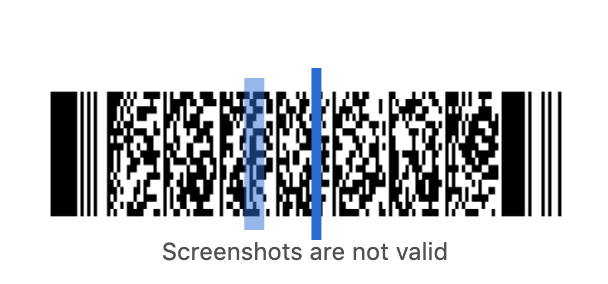
Send the live Tikey URL. A screenshot of a moving barcode may no longer be valid when the recipient tries to use it.
Normal Static QR Code
If the ticket displays a normal square QR code that does not move or animate, select Static QR Code.
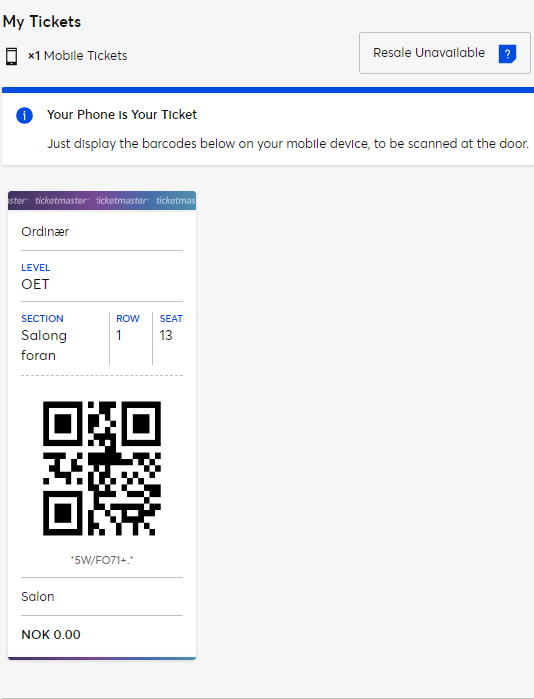
Ticketmaster USA App Only
Select TM USA App when the ticket:
- is available only inside the Ticketmaster USA mobile app;
- cannot be displayed normally on desktop; or
- shows an app-only or fulfilment-related error.

Ticketmaster Event App Only
Select TM Event App only Static QR Code when the ticket is a static QR available only through the event's dedicated mobile app.
If you are unsure, compare your ticket with the examples above before creating the link. Choosing the wrong mode can produce a link that does not display the barcode correctly.
Ticketmaster France FanWallet
FanWallet uses a separate workflow:
- Share FanWallet QR Codes
- Use FanWallet Transfer Links
- Resell Ticketmaster Tickets at Face Value
- Transfer Eligible Tickets
Ticketmaster sharing can be static or dynamic. Always send the live URL rather than a screenshot when the barcode moves.
After creation, use My Links to find, copy, open or delete the Ticketmaster share URL.