🔄 How to Transfer Quentro Tickets
1. Connect your account
Account Manager → Tickets Accounts → Link Accounts → Quentro
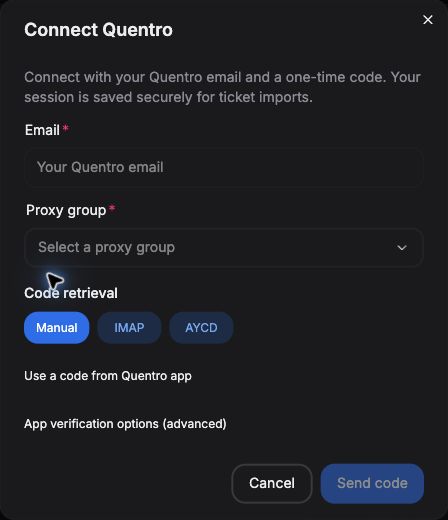
- Email
Your Quentro account email.
- Proxy group
Choose a working group.
- Code retrieval
Manual, IMAP or AYCD.
- Send code
Request your login email.
Get your code
- Manual
- IMAP
- AYCD
Enter the four-digit email code → Connect account.
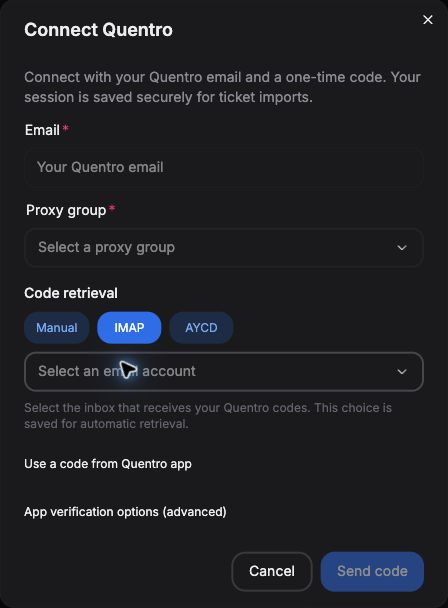
- Choose IMAP
Connect a mailbox in IMAP Manager first.
- Select your mailbox
Choose the inbox receiving Quentro codes.
Click Send code. Tikey retrieves the code and connects automatically.
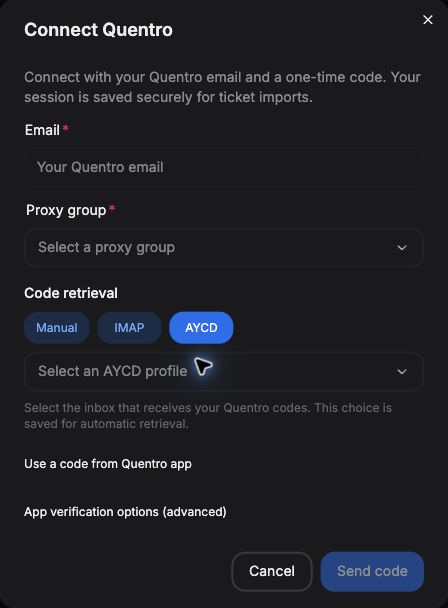
- Choose AYCD
Configure AYCD Inbox first.
- Select your profile
Use the profile receiving Quentro codes.
Click Send code. Tikey retrieves the code and connects automatically.
No code?
Check spam or choose Use a code from Quentro app. Start waiting in Tikey first if using IMAP/AYCD, then request a fresh code in Quentro. Use it in Tikey before the app.
2. Import your tickets
My Tickets → Refresh → Quentro → Select your account
Your session is saved. Reconnect only when asked.
3. Transfer tickets
Select eligible tickets from the same account and event → Actions → Transfer.
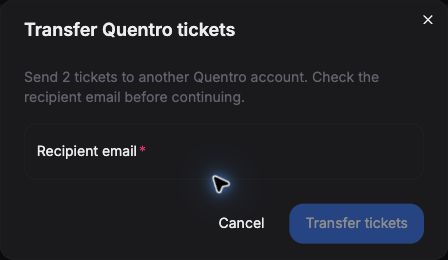
- Check tickets
One or several tickets.
- Recipient
Enter their email.
- Transfer tickets
Submit once.
4. Recall a transfer
Select one or more Awaiting acceptance tickets → Actions → Recall → Confirm.
Accepted transfers cannot be recalled. If the result is unclear, check Quentro before retrying.
Refresh the Quentro account to update status chips. They do not update automatically.
Enter your Tikey Master Password when prompted. For combo tickets or QR display, use the Quentro app.