🔗 How to Create FanWallet Links
Create secure transfer links for your Ticketmaster France tickets using the FanWallet app.
📱 What is the Fan Wallet App For?
With the Fan Wallet app, you can now securely store all your tickets for concerts, sporting events, shows, exhibitions and theme parks. No more hassle of losing or forgetting your precious physical tickets. Our innovative app offers you a seamless experience from purchase to entry to the event.
🔒 Maximum Security
Your peace of mind is our priority. Our app uses the latest encryption technology to ensure the complete security of your tickets. This means you can store your tickets with confidence, knowing that they are protected against any attempts at fraud or theft.
🎫 Compatibility with Your Favorite Ticketing Sites
Fan Wallet allows you to easily import your tickets from the Ticketmaster.fr site but also from many partner ticketing sites such as:
- Leclerc
- Carrefour
- Auchan
- Accor Arena
- Arkéa Arena
- Live Nation
- And many more...
🤝 Easy Ticket Transfer
Sharing the excitement of an event with friends and family has never been easier. Our application allows you to transfer your tickets in just a few clicks. Whether it's to invite friends to accompany you to a concert or to transfer tickets that you can't use, our transfer function makes the process quick, convenient and hassle-free.
📬 Real-Time Information
By accepting notifications, you will be informed when:
- Your final tickets become available
- Your event is modified
- Your transfers are successful
- Important updates about your tickets and your show
Our notification system ensures that you never miss important information.
🎯 Supported Platform
| Platform | Supported Region | Notes |
|---|---|---|
| Ticketmaster | ✅ France | Events using FanWallet app for ticket delivery |
🧭 Steps to Create FanWallet Links
1. Access My Tickets
- Go to My Tickets
- Make sure your tickets are fully loaded
2. Select Your Tickets
- Check the boxes next to the tickets you want to transfer
- You can select multiple tickets from the same event
3. Open FanWallet Transfer
- Click on Options → FanWallet
- The FanWallet modal will open showing all tickets in your wallet
4. Generate Transfer Links
- Review the list of tickets displayed in the FanWallet modal
- Each ticket shows:
- Section and seat information
- Transfer status (Active or Transferred)
- Price
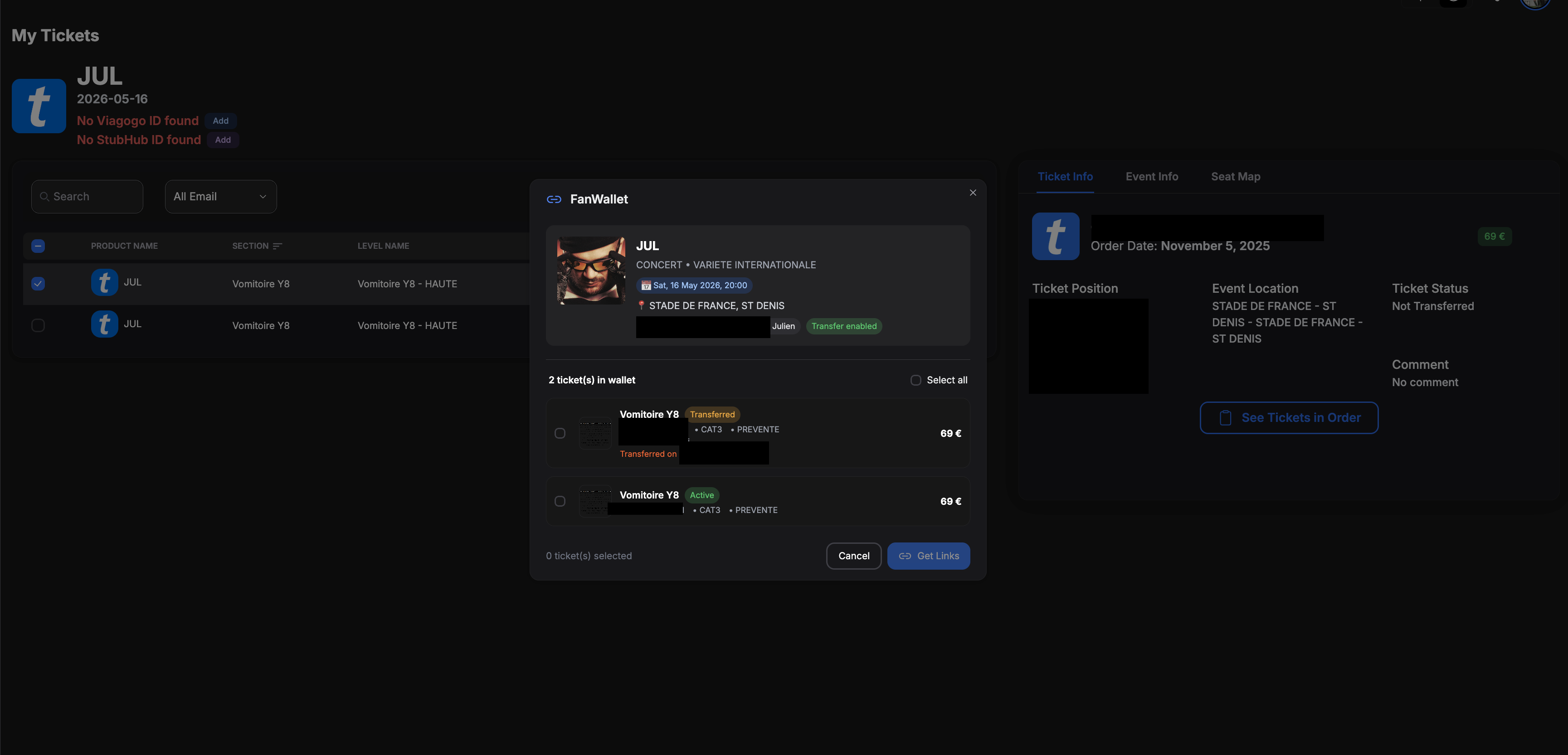
- Click Get Links to generate transfer URLs for each ticket
- If you need to close the modal without generating links, click the red Cancel button
5. Retrieve Your Links
- The system will generate a unique transfer URL for each ticket
- Copy the links and share them with your recipients
- Each link can be used to transfer one ticket to someone else
⚠️ Important Best Practices
You must create at least 2 links at a time for the system to work properly.
- ✅ Good: Generate 2 or more links together (can be the entire wallet)
- ❌ Avoid: Generating only 1 link by itself (link provided will have issues to be redeemed)
The system requires a minimum of 2 links to be created together, but you can create links for your entire wallet:
- Minimum: 2 links (required for functionality)
- Maximum: All tickets in your wallet
- Recommended: Generate all your links at once for convenience
Even if the tickets have different information (section, seat, etc.), you can create them all together. The 2-link minimum is a technical requirement, not a limitation on total transfers.
🔄 Transfer Status
After generating links, you can monitor their status:
- 🟢 Active — Link is ready and can be used for transfer
- 🟠 Transferred on [date] — Ticket has been successfully transferred
💡 Tips
- Each transfer link is unique and can only be used once
- Once a ticket is transferred using a link, it will show as "Transferred"
- Recipients will be able to add the tickets directly to their FanWallet app
- Make sure to send the correct link to the correct person
- You can close the FanWallet modal at any time using the red Cancel button without generating links
❓ Troubleshooting
Links Not Working?
- Ensure you created at least 2 links together (see best practices above)
- Check that the event is eligible for FanWallet transfers
- Verify that tickets haven't already been transferred
Can't See FanWallet Option?
- Only available for Ticketmaster France events
- Event must support FanWallet app for ticket delivery
- Make sure your tickets are fully loaded before attempting