🔗 How to Manage My Links
My Links is the dashboard for QR share links that you already created from My Tickets. Use it to find a link again, check its status, copy or open it, and remove access when the link is no longer needed.
My Links does not create tickets or transfer ownership. To create a new QR link, start with How to Share QR Codes.
1. Open My Links
- Open Inventory → My Links in the sidebar.
- Or go directly to My Links.
- Select the retailer that created the link.
The default retailer is Ticketmaster. There is no All retailers option, so change the retailer if the link you need is not displayed.
Available filters include AXS, DICE, Eventim / FNAC, FanWallet, MLB, See Tickets, Ticketmaster, and Tixr. Gigs and Tours links are listed under See Tickets.
2. Find the Correct Link
Use the controls at the top of the page:
- Choose Upcoming or Past. These tabs use the event date, not the link's expiration or status.
- Search by event name.
- Select the ticket provider.
- Sort events by Soonest first or Latest first.
- In Upcoming, enable Show events with TBD dates when the event date has not been confirmed.
Tikey displays 15 links per page. Use the pagination controls at the bottom when more results are available.
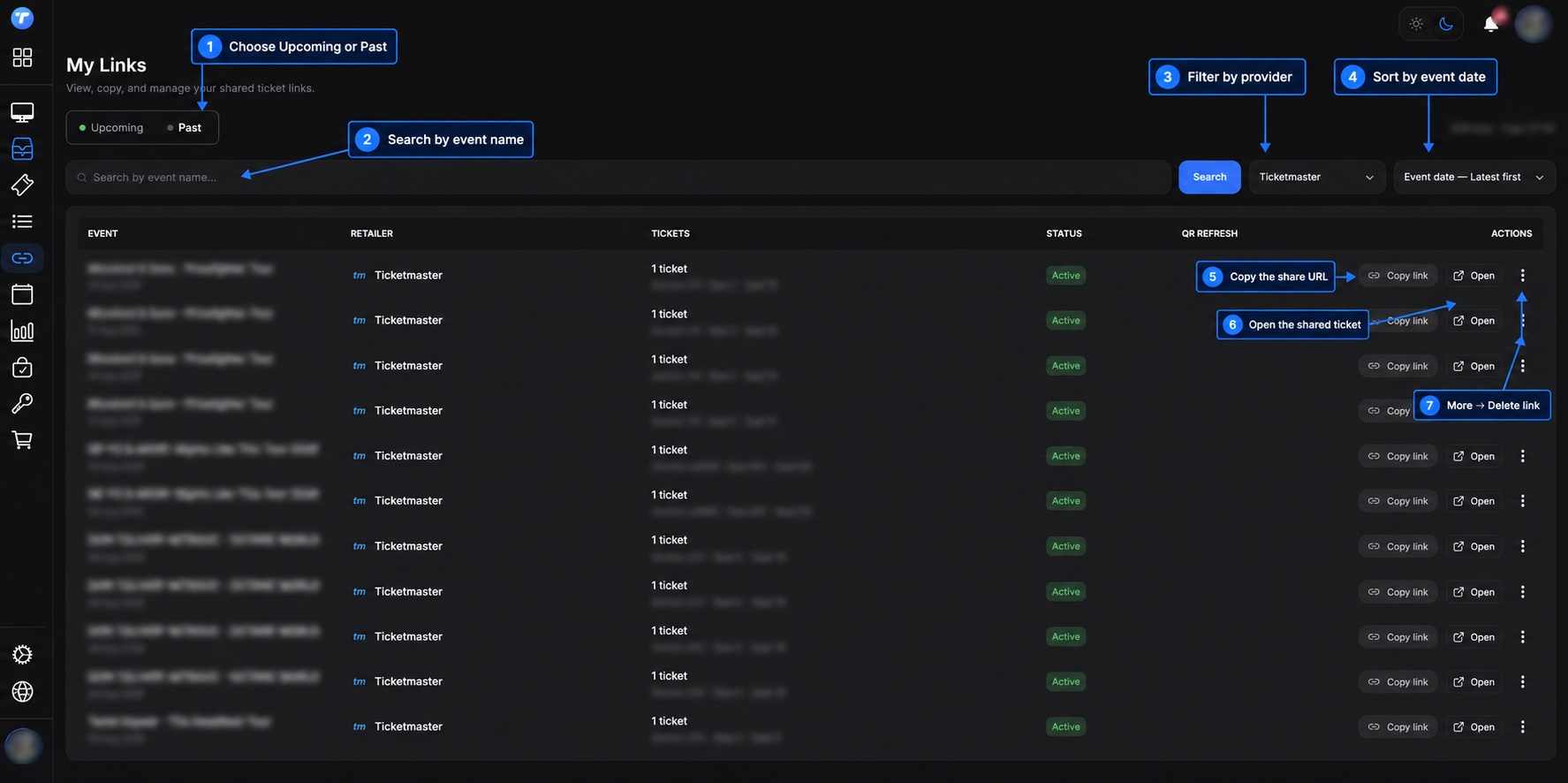
3. Understand Each Column
| Column | What it means |
|---|---|
| Event | Event name and date connected to the link. |
| Retailer | Provider used to create the shared ticket page. |
| Tickets | Number of linked tickets and their placement when available. |
| Status | Active, Expired, or Inactive. The expiration date is displayed when one was selected. |
| QR Refresh | Fnac QR-check information. It is normally empty for other providers. |
| Actions | Copy, open, or delete the share link. |
An expired link can remain visible in My Links until you delete it. Upcoming and Past still depend on the event date.
4. Copy, Open, or Delete a Link
- Copy link: copies the full share URL so you can send it privately to the recipient.
- Open: opens the recipient's shared ticket page in a new tab. Use this to verify the event and ticket before sharing.
- Three-dot menu → Delete link: permanently removes the share URL.
Deleting a link immediately removes the recipient's access, but the original ticket stays in My Tickets and can be shared again. Deleting a grouped AXS share removes the complete grouped link.
There is currently no pause, deactivate, reactivate, or expiration-edit action in My Links. If you need a different expiration, delete the old link and create a new one.
5. Understand Fnac QR Refresh
The QR Refresh column is used for Fnac links:
| Message | Meaning |
|---|---|
| QR refreshed | Every attached ticket has a successful QR-check time. |
| QR partly refreshed | Only some tickets in the link have a recorded QR check. |
| Different QR refresh times | Tickets in the same link were checked at different times. |
| No QR refresh recorded | Tikey has not yet recorded a successful Fnac QR check. |
| Link disconnected | No current ticket is attached to the saved share link. |
The displayed time uses the Paris timezone. QR refreshed confirms a successful check; it does not necessarily mean that Fnac changed the barcode value.
My Links does not contain a Refresh button. To check for a newer Fnac QR, use My Tickets → Refresh → Eventim → FNAC account. If Fnac provides a new barcode, Tikey updates the existing share URL. See Fnac Ticket Vault and QR Sharing.
6. Provider Differences
- AXS: several selected tickets can belong to one grouped share URL. Deleting it removes access to the whole group.
- Ticketmaster: static and moving barcodes are both managed here after their links are created.
- See Tickets / Gigs and Tours and DICE: existing static links do not receive Fnac-style barcode updates. If the provider changes the barcode, delete the old link, Refresh the ticket, and create a new link.
- MLB: the QR rotates automatically on the shared page; My Links is used to copy, open, or delete its URL.
- Tixr: one share can contain several tickets with live QR and swipe navigation. Deleting a ticket from My Tickets does not delete its saved share. Delete link removes the whole shared page. See Tixr QR Sharing.
- FanWallet: its QR links appear under the FanWallet retailer filter; transfer links use a separate workflow.
Use Guides by Platform for the exact creation and refresh rules for each provider.
Keep Share Links Private
Anyone who has a working share URL can open the ticket barcode. Send it only to the intended recipient, choose a short expiration when possible, and delete the link when access is no longer required.