🔄 How to Transfer Tickets
Tikey allows you to transfer eligible tickets directly to another user — without logging into the original platform.
🎟️ Supported Platforms
| Platform | Supported Regions | Notes |
|---|---|---|
| AXS | ✅ All regions | Transfer works without OTP |
| Ticketmaster | ✅ All regions | Email OTP needed |
| Ticketmaster | ✅ UK, AU, NZ | No OTP needed (some events might be ot eligible) |
| Ticketmaster | ✅ France | If the event uses FanWallet, you can download a PDF with the QR code instead of transferring |
| SeeTickets | ✅ All regions | Transfer available |
| GigsAndTours | ✅ All regions | Transfer available |
🧭 Steps to Transfer a Ticket
-
Go to My Tickets
-
Select the ticket(s) from the list
-
Click on Options → Transfer
-
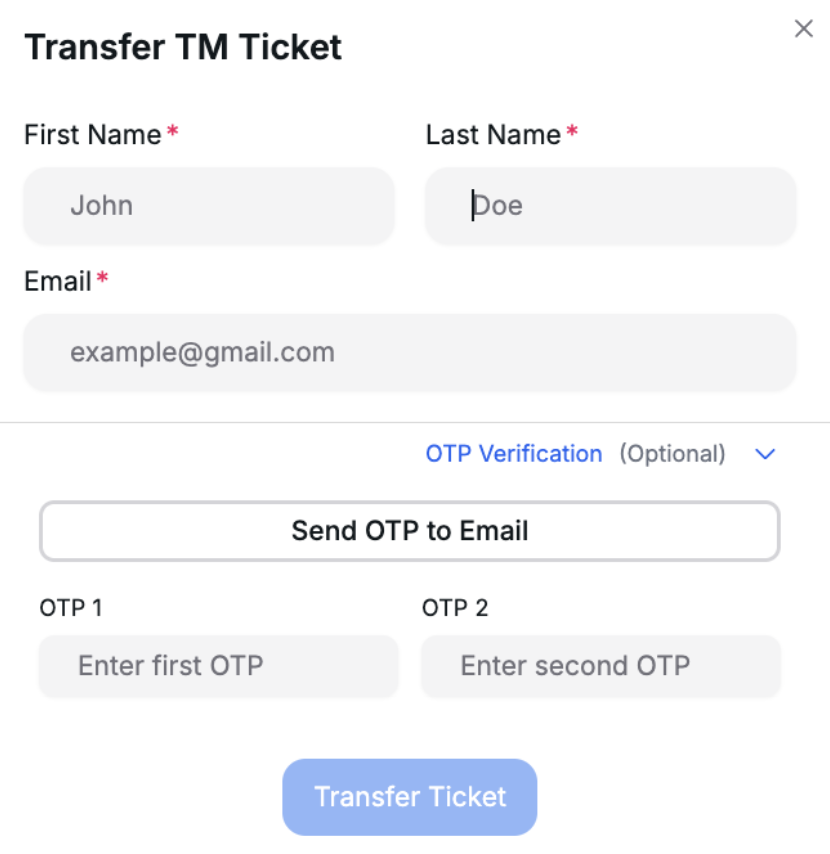
Fill in:
- First Name
- Last Name
- Email address of the recipient
- For Ticketmaster:
- UK region no OTP method: If you leave the OTP fields empty, the system will use the No OTP Bypass method (works only in the UK, and some venues like Wembley are not supported, you can also use method below).
- All regions:
- Click Send OTP to Email
- Wait to receive the OTP code via email
- Wait for the popup to indicate it’s Ready
- Enter OTP into the field
- Then click Transfer Ticket
-
Click Transfer Ticket
📦 Special Case: Ticketmaster FR (FanWallet)
For some TM FR events using FanWallet:
- You won't transfer the ticket
- Instead, click Options → Download PDF
- You will receive a printable PDF that includes the QR Code
📥 The file will be auto-generated and available immediately after clicking.
📬 Webhook Notification
If you've configured a Discord webhook in your Settings, you'll receive updates like:
- ✅ Transfer started
- ✅ Transfer completed
- ❌ Transfer failed
Make sure your Discord webhook is active and saved.
✅ Tips
- For AXS and SeeTickets, transfers are near-instant
- For TM FR, PDF generation is only available when FanWallet is enabled for that event
- If the transfer is not available, double-check the event region or platform rules
Let us know via support if you need additional platforms added to this feature !