Fix records and understand Finance
Fix or remove a record
First identify where the card appears:
- Connected area: the source came from a connected account.
- Other marketplace records: a user created it manually.
Use the smallest action that fixes the problem:
| Need | Action |
|---|---|
| Correct manual listing details | Edit listing details |
| Correct a manual sale | Edit sale |
| Return a sold manual listing to Listed | Undo sale |
| Delete a direct manual sale | Remove sale |
| Delete a manual listing | Remove record; confirmation tells you if its attached sale is also removed |
| Detach a connected reseller record and its connected sales locally | Unlink [Marketplace] |
| Clear every confirmed sale for the selected tickets | Mark as not sold |
This cancels every confirmed sale for the selected tickets, across connected and manual sources and across marketplaces. Listing links remain, and nothing changes on any marketplace. Prefer Undo sale, Remove sale, Remove record, or Unlink when only one record is wrong. Connected sale data can return if its source still reports the ticket as sold.
Unlink never changes the marketplace. It detaches that marketplace's connected records from the selected tickets and removes its connected sales from Tikey Manager and Finance. A reseller listing must be associated again after unlinking. An AXS refresh may recreate AXS connected data. Ticketmaster currently has no Unlink action in the editor.
Read Finance
- To limit Finance to specific tickets, select their rows before opening it.
- Open Finance from the event inventory.
- Check the scope below the title: with a selection it uses selected tickets; without one it uses the currently visible tickets.
- Choose Display currency.
Finance converts monetary values—Spent, listing prices, sale prices, and averages—into that currency. It then recalculates profit, margin, and ROI.
Monetary values in their original currencies
                    ↓ Convert
Values in the selected Display currency
                    ↓
For multiple listings or sales on one ticket,
keep the highest converted price
                    ↓
Totals, averages, profit, margin and ROI
- For multiple listings, it uses the highest converted active listing price per ticket, never the sum.
- For multiple sales, it uses the highest converted confirmed sale price per ticket, never the sum.
- A ticket sold anywhere is excluded from Potential.
- If a price cannot be converted, Finance shows Incomplete currency conversion and avoids an unsafe comparison.
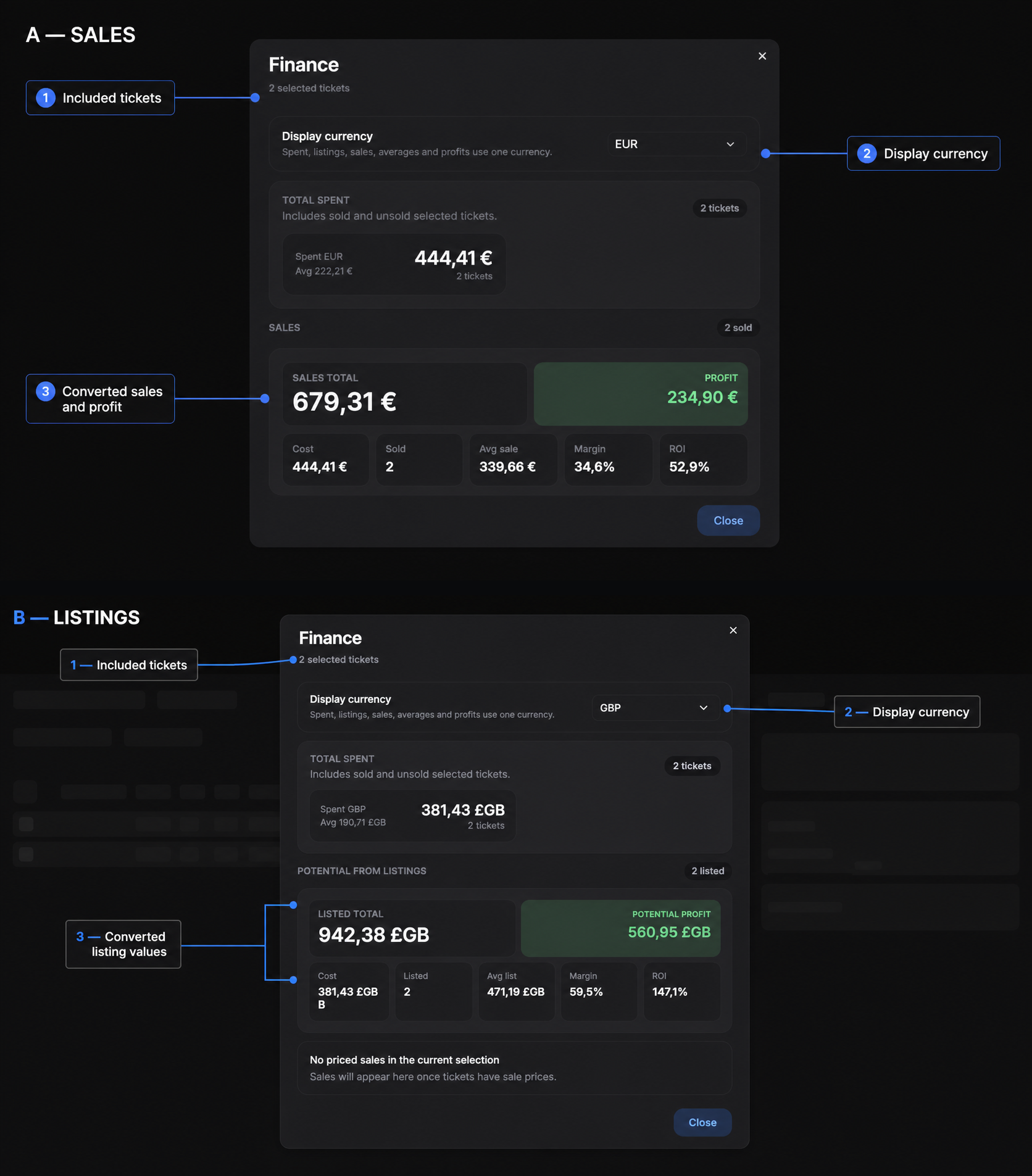
Finance converts monetary values into the selected currency, then recalculates profit, margin, and ROI. If a rate is missing, it shows Incomplete currency conversion instead of comparing raw values.
Quick fixes
| Problem | Check |
|---|---|
| Sold remains after removing one sale or record | Another connected or manual sale still exists |
| A connected sale returns | Its marketplace source still reports Sold |
| Associated listing sold but tickets did not | Refresh the correct My Listings account and confirm an explicit Sold/Sold out/Sale completed/0 remaining status |
| Finance omits a value | Check cost, unit price, currency, and exchange rate |
| Finance does not add two prices | Expected: it uses the highest converted price, not the sum |
If a reseller listing only disappears, do not mark it sold automatically. Missing is not proof of a sale.
Return to the Listings & Sales Overview whenever you are unsure which workflow to use.