Release Calendar
Track public sales and presales on Ticketmaster, including France, and AXS. Save favorites and get Discord reminders before tickets go on sale.
1. Find a sale
Open Calendar → Release Calendar, or open the calendar.
- Choose Ticketmaster or AXS, then search by artist or show.
- Filter by region, country and sale type. More filters adds city, venue and show dates. Ticketmaster also has artist and promoter filters.
- Use Starting from to pick a sale date, the arrows to move five days, or Today to return to today.
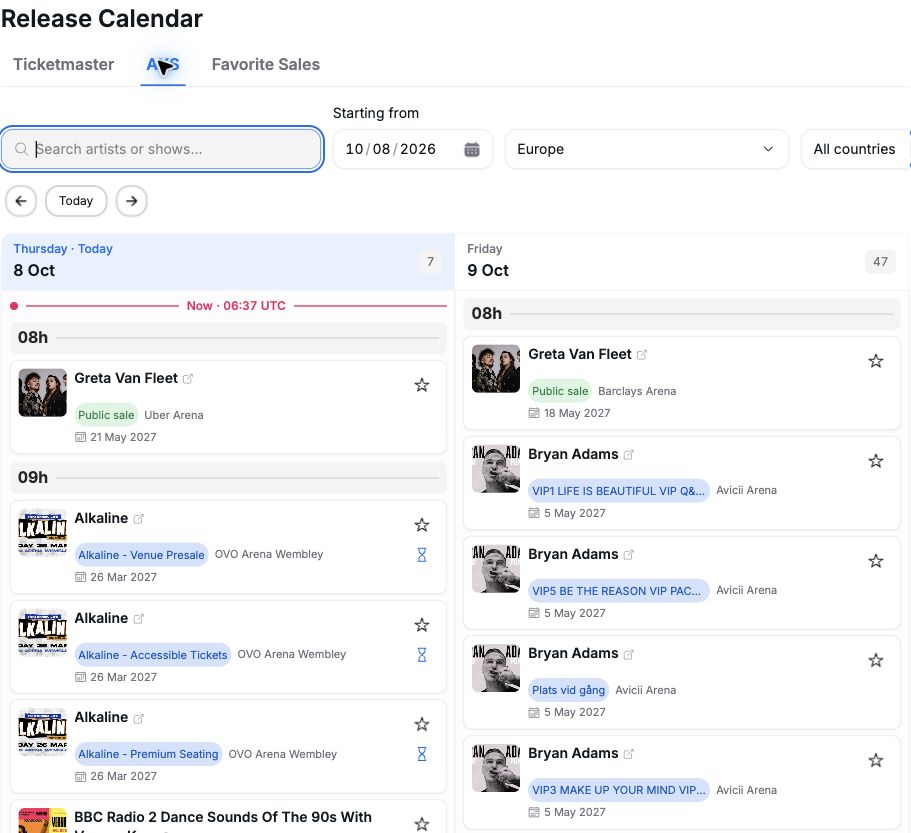
Column date + hour = sale opening, in UTC. The small date on the card is the show date.
| On the card | What it does |
|---|---|
| Event name / external-link icon | Opens the official ticket page. |
| Sale label | Identifies the public sale or presale, when the provider supplies its name. |
| Star | Saves or removes that specific sale. A gold star means saved. |
| Hourglass (AXS) | Opens that sale's queue, when a queue link is available. |
2. Save your favorites
Click a sale's star, then open Favorite Sales to see your saved Ticketmaster and AXS sales together. Your filters still apply.
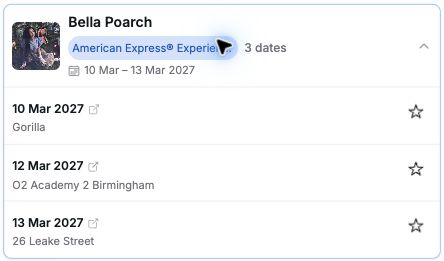
Expand cards marked “2 dates”, “3 dates”, etc. Each date has its own venue, star and ticket link, plus an AXS queue link when available.
The star in Artists & shows saves all currently published sales for that artist or show. It does not follow future releases automatically.
3. Get Discord reminders
- Open Settings → Preferences → Integrations.
- Paste your Discord webhook URL into Webhook and click Save webhook.
- Star your chosen sales. Reminders are automatic.

Tikey sends a reminder about 30 minutes before opening, with the sale time, event details and available ticket/queue links. Sales opening together are grouped into one message. You do not need to keep Tikey open.
No reminder? Check your saved webhook and the star on the exact public sale or presale. Without a webhook, favorites only appear in your calendar.
The calendar updates automatically. Refresh loads the latest available data; Last synced shows when it was last collected.